
AI in E-Commerce Design: Opportunities, Limitations, and What Actually Works
The e-commerce landscape has been permanently altered by artificial intelligence. From AI-generated product descriptions to automated image enhancement, online retailers are rushing to adopt these tools with the promise of reducing costs and accelerating production.
But here's the uncomfortable truth most AI enthusiasts don't want to hear: AI is a powerful tool, not a replacement for expertise.
As someone who's designed e-commerce experiences for years and now integrates AI into workflows, I've watched both the remarkable successes and spectacular failures of AI in e-commerce design. Let me show you what actually works, where AI falls dangerously short, and how to use these tools strategically rather than recklessly.
The AI E-Commerce Revolution: What's Actually Changing
AI has introduced capabilities that seemed like science fiction just three years ago:
Product Photography at Scale AI can now generate lifestyle images from single product shots, create background variations, and even produce model photos without photoshoots. Tools like Midjourney, DALL-E, and specialized e-commerce platforms can create product imagery in minutes that would have taken days.
Personalized Shopping Experiences AI-powered recommendation engines analyze browsing behavior, purchase history, and preferences to create individualized shopping experiences that increase conversion rates by 20-30%.
Dynamic Pricing and Inventory Optimization Machine learning algorithms predict demand, optimize pricing strategies, and manage inventory with unprecedented accuracy.
Automated Content Creation Product descriptions, category copy, and even email campaigns can be generated at scale, maintaining consistency while reducing production time.
Enhanced Search and Discovery Visual search, natural language processing, and predictive search improve how customers find products, reducing bounce rates significantly.
Where AI Excels in E-Commerce Design
Let me be clear: when used correctly, AI is transformative. Here's where it genuinely adds value:
1. Rapid Prototyping and Concept Development
AI excels at generating multiple design variations quickly. Need to explore 20 different homepage layouts? AI can produce initial concepts in minutes, giving you a starting point for refinement.
Real Application: When redesigning category pages, I use AI to generate layout variations, testing different visual hierarchies before investing time in detailed mockups.
2. Background Removal and Basic Image Enhancement
AI-powered background removal tools have become remarkably accurate. For e-commerce sites needing consistent white backgrounds across thousands of products, this is genuinely game-changing.
Real Application: Processing 500 product images for consistent backgrounds that used to take days now takes hours.
3. Lifestyle Scene Generation (With Major Caveats)
AI can create lifestyle scenes showing products in use—a couch in a living room, a watch on a wrist, skincare products on a bathroom counter. This capability significantly reduces photography costs.
But here's the catch: These images require extensive post-processing to be commercially viable. More on this shortly.
4. A/B Testing Asset Creation
Need 10 variations of a hero banner to test? AI can generate options faster than traditional design methods, accelerating optimization cycles.
5. Pattern and Texture Generation
For fashion and home decor e-commerce, AI can generate unique patterns, textures, and colorways, expanding product lines without manufacturing costs.
The Critical Gap: Where AI Fails E-Commerce Design
This is where we need to talk about the elephant in the room: AI-generated content that looks "almost right" but fundamentally undermines brand credibility.
The Text Problem
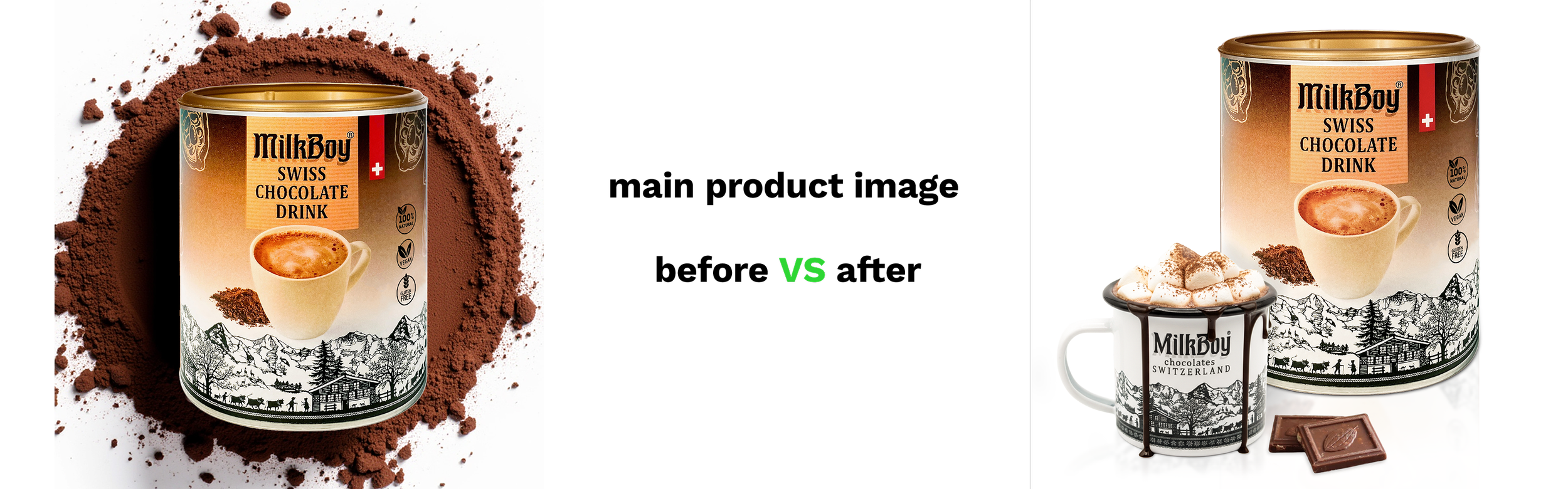
AI consistently struggles with text in images. Product packaging, labels, signs, and any written elements often come out garbled, misspelled, or completely nonsensical.
Why this matters: Customers subconsciously register these errors as "fake" or "cheap," damaging trust in your brand. A luxury skincare brand using AI-generated lifestyle imagery with mangled label text loses its premium positioning immediately.

*Final generated image without corrections and retouch.
The Anatomy Problem
Hands with six fingers. Faces with asymmetrical eyes. Bodies with impossible proportions. AI's anatomical errors are infamous and instantly recognizable.
Why this matters: These errors create an "uncanny valley" effect that makes customers uncomfortable. For fashion and beauty e-commerce especially, anatomical inaccuracy is brand suicide.
The Brand Consistency Problem
AI doesn't understand your brand guidelines. It can't maintain the subtle consistency in lighting, mood, and aesthetic that makes your brand recognizable.
Why this matters: E-commerce success depends on cohesive visual storytelling. Random AI-generated images that don't share a consistent visual language create a disjointed, unprofessional shopping experience.
The Detail Problem
AI struggles with fine details: fabric textures, jewelry intricacy, product materials, surface finishes. These details are exactly what customers scrutinize when making purchase decisions.
Why this matters: E-commerce has a higher return rate than physical retail (20-30% vs. 8-10%). Inaccurate product representation increases returns, damages reviews, and destroys customer trust.
The Professional Workflow: How to Actually Use AI in E-Commerce
Here's the methodology I use and teach clients who want to leverage AI without sacrificing quality:
Phase 1: Strategic Prompting
This isn't about typing "lifestyle photo of product." Professional prompting requires:
Understanding composition and lighting terminology
Specifying style references and mood
Controlling color palettes and environments
Defining camera angles and perspectives
Iterating with specific adjustment prompts
Time investment: 30-60 minutes per concept to get usable base images
Phase 2: Reference Preparation
AI works best with visual references. Prepare:
Mood boards showing desired aesthetic
Reference images for composition
Brand guideline adherence
Color palette specifications
Phase 3: High-Resolution Output
Never use AI-generated images at their native resolution. Always:
Upscale using specialized AI upscaling tools (Topaz, Gigapixel, etc.)
Ensure sufficient resolution for intended use (72 DPI for web minimum, 300 DPI for print)
Check for artifacting and generation errors at full resolution
Phase 4: Professional Retouching (Non-Negotiable)
This is where expertise becomes essential. Every AI-generated e-commerce asset requires:
Photoshop Skills Required:
Layer masking and blending
Clone stamp and healing brush proficiency
Color correction and grading
Lighting adjustment and consistency
Text recreation and label correction
Anatomical corrections
Detail enhancement and sharpening
Typical time investment: 1-3 hours per image depending on complexity

*Fixed and retouched image, ready for client review.
Phase 5: Brand Alignment
Final images must be evaluated against:
Brand guidelines compliance
Consistency with existing product library
Technical specifications (file format, size, naming conventions)
Accessibility considerations (alt text, contrast)
The Economics: Is AI Actually Cost-Effective for E-Commerce?
Let's do the math honestly:
Traditional Photography Approach:
Photoshoot: $2,000-5,000 per day
Post-production: $50-150 per image
Total for 50 product lifestyle images: $7,500-12,500
AI-Enhanced Approach:
AI generation: $30-100 per month (subscription)
Prompting and generation time: 20-40 hours
Professional retouching: $75-150 per image
Total for 50 product lifestyle images: $4,000-7,700
Savings: 30-40% but with caveats:
Requires skilled professionals who understand both AI tools AND traditional design
Not suitable for all product categories or brand aesthetics
May require more iterations to achieve brand consistency
AI E-Commerce Design: Strategic Implementation Guidelines
Based on dozens of e-commerce projects, here's when to use AI and when to stick with traditional methods:
Use AI For:
High-volume background removal
Initial concept exploration
A/B testing asset variations
Pattern and texture generation
Lifestyle scenes for mid-tier products
Secondary category imagery
Avoid AI For:
Hero imagery and homepage features
Premium/luxury product photography
Products where texture and material detail matter critically
Brand-defining visual assets
Situations where inconsistency damages brand equity
The Future: AI as Enhancement, Not Replacement
The most successful e-commerce brands aren't choosing between AI and human expertise—they're strategically combining both.
AI accelerates production and reduces costs, but professional designers ensure brand integrity, maintain consistency, and catch the subtle errors that destroy credibility.
The real competitive advantage isn't access to AI tools (everyone has that). It's having professionals who know how to use these tools strategically while maintaining the design standards that build trust and drive conversions.
Embrace AI with Eyes Wide Open
AI has permanently changed e-commerce design, but not in the way most people think. It hasn't made designers obsolete—it's made skilled designers more valuable than ever.
The winners in AI-enhanced e-commerce will be those who understand both the capabilities and limitations of these tools, who invest in proper implementation workflows, and who refuse to sacrifice brand integrity for short-term cost savings.
Need help implementing AI into your e-commerce design workflow strategically? With experience in both traditional UI/UX design and modern AI tools, I help online retailers leverage artificial intelligence without compromising quality. Let's discuss your project.
