
The Reality of AI in Design: Why Prompting Alone Won't Make You a Designer
There's a new wave of "AI designers" flooding the market. They've taken courses, mastered prompting techniques, and can generate stunning images from text descriptions in seconds. Their portfolios look impressive at first glance—until you look closer.
The problem? They've skipped the fundamentals.
As someone who's spent years mastering traditional design tools before integrating AI into my workflow, I'm watching a concerning trend: creators who believe AI has made design skills obsolete. They can prompt, but they can't problem-solve. They can generate, but they can't refine. They produce volume, but not quality.
Let me explain why the most critical work begins AFTER AI generates your image—and why skipping traditional design skills will always result in amateur work, no matter how good your prompts are.
The Seductive Promise (And Dangerous Misconception) of AI Design
AI tools market themselves with appealing simplicity: "Type what you want, get professional results." This promise has attracted thousands of newcomers to design—people who see an opportunity to enter a creative field without years of training.
The appeal is understandable:
Traditional design education takes years
Professional software like Photoshop has steep learning curves
Client work requires technical skills that aren't quickly learned
AI appears to democratize design, making it accessible to everyone
But here's what these marketing promises omit: AI generates starting points, not finished products.
The gap between an AI-generated image and a client-ready asset is vast—and that gap can only be bridged with traditional design skills, software proficiency, and professional judgment.
The Complete Professional AI Design Workflow
Let me walk you through what actually happens when a client requests a lifestyle image for their product—because this is where theory meets reality.
Scenario: Client Needs Lifestyle Product Photography
Client provides:
One product image (white background, good lighting)
Brief: "We need lifestyle photos showing our skincare product in a luxury bathroom setting"
What an amateur AI creator does:
Writes a prompt describing the scene
Generates images
Selects the best one
Delivers it to the client
Result: Image with distorted product labels, weird lighting inconsistencies, anatomical errors if a hand is shown, and a generic aesthetic that doesn't match the brand.
What a professional does:
Phase 1: Proper Prompting (The Foundation)
This isn't casual prompt writing. Professional prompting requires:
Understanding Photography Terminology:
Lighting setups (three-point lighting, natural window light, golden hour)
Camera angles and framing (straight-on, 45-degree angle, overhead flat lay)
Composition rules (rule of thirds, leading lines, negative space)
Depth of field and focus specifications
Style Definition:
Specific aesthetic references (Scandinavian minimalism, French rustic, modern luxury)
Color palette specifications matching brand guidelines
Mood and atmosphere descriptions
Material and texture details
Technical Specifications:
Aspect ratios for intended use
Resolution requirements
Lighting and shadow characteristics
A professional prompt example: "Luxury skincare product on white marble bathroom counter, natural morning light from left side creating soft shadows, minimalist Scandinavian aesthetic, muted color palette with warm beige tones, shallow depth of field with product in sharp focus, background slightly blurred showing eucalyptus branch and white towel, shot with 50mm lens, product label facing camera at 30-degree angle, professional product photography style, high-end beauty editorial lighting, --ar 4:5 --style raw --q 2"
An amateur prompt: "Skincare product on bathroom counter looking nice"
The difference in output quality starts here.
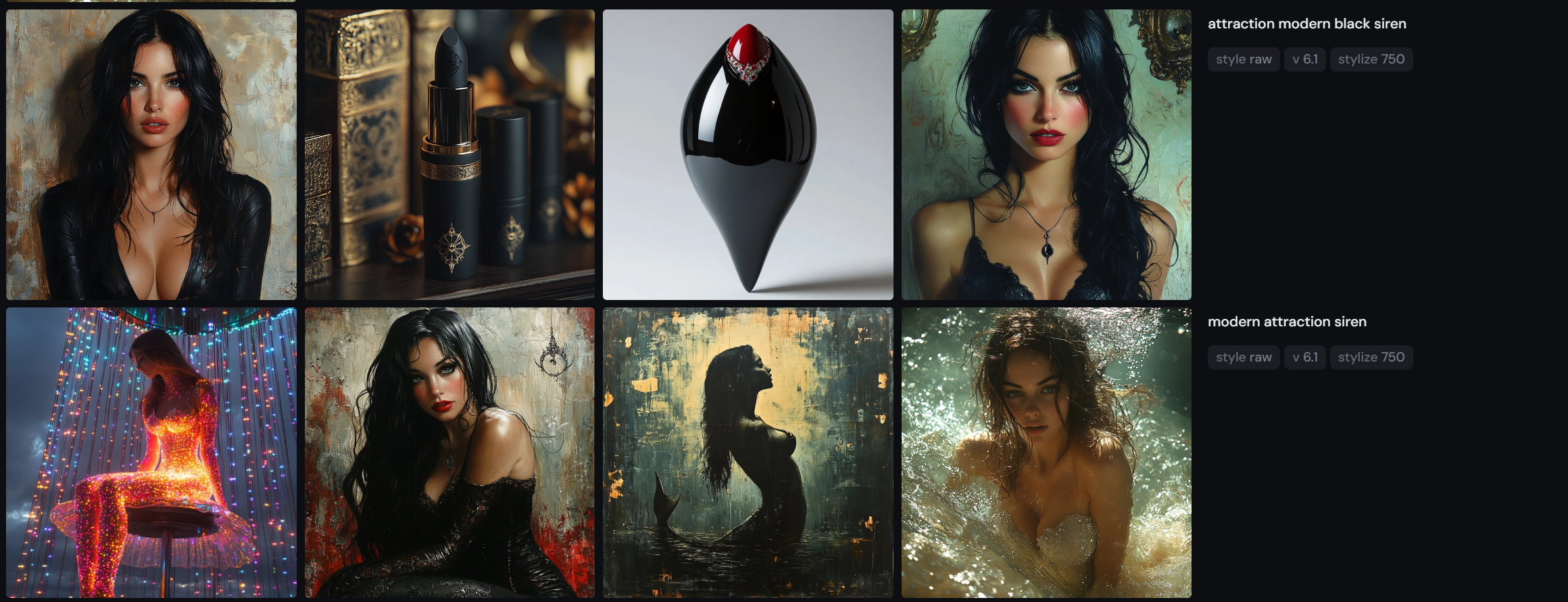
*Amateur prompt example in MidJourney.
Phase 2: Reference Preparation (What Most People Skip)
Professional AI use involves providing visual references:
Collect and prepare:
Mood board of desired aesthetic (8-12 reference images)
Product shots from multiple angles
Brand guideline references for color accuracy
Composition examples showing desired layout
Lighting reference images
Image references guide AI toward:
Consistent style matching your brand
Specific composition and framing
Accurate color palettes
Appropriate mood and atmosphere
Why this matters: Without references, AI generates generic, stock-photo-looking images that lack brand personality and distinctiveness.
Phase 3: Generation and Selection (Only 30% of the Work)
Generate multiple variations:
Minimum 15-20 images per concept
Evaluate for composition, lighting, errors, brand fit
Select the 2-3 with strongest potential
Critical evaluation criteria:
No major anatomical errors
Product positioning allows for label correction
Lighting is consistent and believable
Composition follows design principles
Overall aesthetic matches brand guidelines
Time investment: 1-2 hours of generation and evaluation
Phase 4: Upscaling (Absolutely Essential)
Here's where many AI creators fail immediately: using low-resolution AI outputs.
Why native AI resolution isn't sufficient:
Most AI tools generate 1024x1024 or 1792x1792 pixels
Professional use requires 2000+ pixels for web, 3000+ for print
Low resolution images look pixelated, lack detail, appear amateur
Professional upscaling process:
Use specialized AI upscaling tools (Topaz Gigapixel AI, Let's Enhance, Magnific AI)
Upscale to appropriate resolution for intended use
Maintain detail and minimize artifacting
Verify quality at 100% zoom
Why this requires expertise:
Different upscaling algorithms work better for different image types
Settings need adjustment based on the image content
Sometimes multiple upscaling passes are needed
Artifacts need to be identified and addressed
Time investment: 15-30 minutes per image
Phase 5: Professional Retouching (Where Design Skills Become Essential)
This is the phase that separates professionals from amateurs—and it's entirely dependent on traditional design software proficiency.
Critical retouching tasks that ALWAYS need to be done:
1. Product Label Correction (Non-Negotiable)
AI consistently mangles product labels, text, and branding elements.
Required Photoshop skills:
Layer masking to isolate label area
Perspective correction to match label angle
Clean extraction of original label from product image
Precise placement and blending onto AI-generated scene
Lighting adjustment to match environment
Shadow and reflection creation for realism
Without these skills: You deliver an image with garbled text that screams "fake" and damages brand credibility.
Time investment: 30-60 minutes per product
2. Anatomical Corrections
If the image includes hands, faces, or people, AI errors are almost guaranteed.
Common issues requiring correction:
Extra or missing fingers
Incorrect hand proportions
Asymmetrical facial features
Impossible body positions
Weird joints or limbs
Required Photoshop skills:
Advanced cloning and healing techniques
Liquify tool for proportion correction
Frequency separation for skin retouching
Content-aware fill for removing/adding elements
Understanding of anatomy to identify and fix errors
Without these skills: Uncanny valley effect that makes viewers uncomfortable and destroys image credibility.
Time investment: 45-90 minutes depending on severity
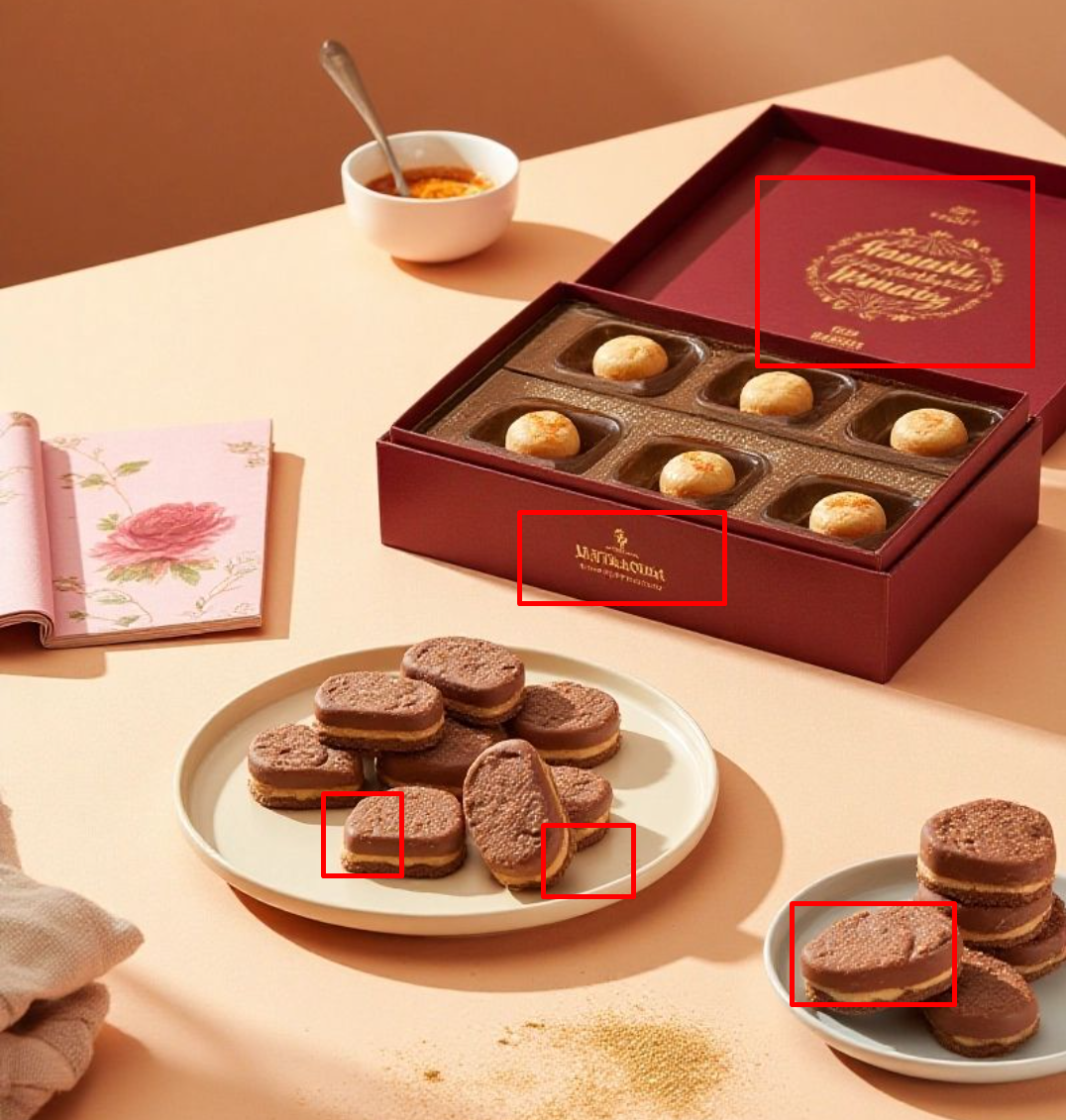
*Amateur final image delivered to the brand with multiple critical issues including quality, label and copy issues, wrong proportions of the product. Source: Pinterest
3. Lighting and Color Consistency
AI often creates inconsistent lighting or colors that don't match brand guidelines.
Required adjustments:
Color grading to match brand palette
Lighting consistency across all elements
Shadow and highlight adjustments
Color balance and temperature correction
Selective color adjustments for product accuracy
Required Photoshop skills:
Curves and levels adjustments
Selective color tools
Layer blend modes
Adjustment layers and masking
Color theory understanding
Without these skills: Images that don't match brand identity and look inconsistent in your product catalog.
Time investment: 30-45 minutes per image
4. Detail Enhancement and Refinement
AI-generated images often lack the fine details that make images feel premium and professional.
Professional enhancement includes:
Sharpening with appropriate technique (Smart Sharpen, High Pass)
Texture and detail enhancement
Removing AI artifacts and inconsistencies
Background cleanup and refinement
Adding subtle elements that increase realism
Required Photoshop skills:
Advanced sharpening techniques
Frequency separation
Dodge and burn for dimensional depth
Layer styles and blending
Understanding when and how much enhancement is appropriate
Time investment: 20-30 minutes per image
Phase 6: Final Brand Alignment
After all retouching, professional work includes:
Quality control checklist:
✓ Color accuracy matches brand guidelines
✓ All text and labels are correct and legible
✓ No anatomical or perspective errors remain
✓ Lighting is consistent and believable
✓ Resolution is appropriate for intended use
✓ File format, naming, and metadata are correct
✓ Image works across different backgrounds/contexts
✓ Accessibility considerations (alt text prepared)
Technical delivery:
Proper file formats (PNG for transparency, JPEG for photos)
Correct color space (sRGB for web, CMYK for print)
Appropriate compression balancing quality and file size
Organized file naming and folder structure
The Skill Gap: What "AI-Only" Creators Can't Do
Let's be brutally honest about what happens when creators skip traditional design education:
They can't:
Fix anatomical errors because they don't understand anatomy
Correct perspective because they don't understand spatial relationships
Adjust lighting properly because they don't understand how light behaves
Match brand guidelines because they don't understand color theory
Create professional compositions because they don't understand design principles
Deliver print-ready files because they don't understand technical specifications
The result:
Client revisions that spiral endlessly
Images that look "AI-generated" (and not in a good way)
Inability to problem-solve when AI doesn't generate exactly what's needed
Loss of clients after first project when quality issues emerge
Inability to scale beyond simple generation tasks
The Economic Reality: Why Clients Won't Pay for Unrefined AI Output
Here's the uncomfortable truth about pricing:
Amateur AI creators charge: $20-50 per image Professional designers charge: $150-500 per image
Why the massive difference? Because professionals deliver:
Images that are actually usable without client-side fixes
Brand-consistent assets that integrate with existing materials
Problem-solving when the brief requires creative solutions
Technical expertise ensuring files work across all applications
Accountability and professional standards
Clients initially attracted to low AI-only pricing quickly discover they need to hire a real designer to fix the work—costing more in total than hiring a professional initially.
The Path Forward: Becoming a Professional AI-Enhanced Designer
If you're serious about design using AI tools, here's the skill development path:
Phase 1: Master Traditional Fundamentals (6-12 months)
Adobe Photoshop proficiency (layers, masking, retouching, color correction)
Design principles (composition, color theory, typography, layout)
Photography basics (lighting, exposure, composition)
Brand and identity design concepts
Phase 2: Understand Your Industry (3-6 months)
Study professional work in your niche
Understand client needs and business objectives
Learn technical requirements (print specs, web optimization)
Build knowledge of trends and best practices
Phase 3: Integrate AI Strategically (Ongoing)
Learn professional prompting techniques
Understand which tasks AI handles well
Develop workflows that combine AI and traditional skills
Practice quality control and refinement
The timeline: 12-18 months to become genuinely professional, not 3-month course.
Case Study: When AI Shortcuts Backfire
Let me share a real scenario I encountered:
A client came to me after hiring an "AI designer" who charged $30 per lifestyle image. They needed 20 images for a product launch.
What they received:
Images with garbled product labels
Inconsistent lighting and colors
Anatomical errors (six-fingered hands)
Low resolution unsuitable for their needs
Generic aesthetic that didn't match their brand
What they paid me to fix:
$200 per image to completely retouch and correct
Total cost: $4,000 to fix + $600 initial cost = $4,600
Timeline delay: 2 weeks before launch
What they should have paid originally:
$175 per image with professional designer: $3,500
Delivered correct the first time, on schedule
The "cost savings" of hiring an amateur actually cost them $1,100 more and delayed their launch.
AI Is a Tool, Not a Replacement for Expertise
AI has revolutionized design workflows, but it hasn't eliminated the need for fundamental skills. If anything, it's raised the bar for what "professional" means.
The creators who will succeed in the AI era aren't those who can generate the most images—they're the ones who can refine those images into genuinely professional work that builds brands and drives results.
If you're a creator: Invest in learning proper design tools. Take the time to understand retouching, color correction, composition, and design principles. AI amplifies your skills; it doesn't replace them.
If you're a client: Understand that AI doesn't make design free. The real value is in a professional who knows how to use these tools strategically while maintaining quality standards.
Ready to work with a designer who combines AI efficiency with traditional expertise? I help clients leverage AI tools without sacrificing quality, delivering brand-consistent assets that actually drive results. Let's discuss your project.
